All official European Union website addresses are in the europa.eu domain.
See all EU institutions and bodies
An official website of the European Union | How do you know?
Environmental information systems
EN

- BG български
- ES Español
- CS Čeština
- DA Dansk
- DE Deutsch
- ET Eesti keel
- EL Ελληνικά
- EN English
- FR Français
- GA Gaeilge
- HR Hrvatski
- IT Italiano
- LV Latviešu
- LT Lietuvių
- HU Magyar
- MT Malti
- NL Nederlands
- PL Polski
- PT Português
- RO Română
- SK Slovenčina
- SL Slovenščina
- FI Suomi
- SV Svenska Non-EU Languages
- IS Íslenska
- NN Nynorsk
- TR Türkçe

Navigator - Climate Resilience Tools
Frequently Asked Questions
Page
General
What is the Navigator of Climate Resilience Tools?
The Navigator of Climate Resilience Tools (The Navigator) is an interactive, searchable database of existing, trusted tools that can be used to support climate adaptation and resilience. The objective is to support anyone – experts and non-experts alike - in navigating the plethora of existing tools. The tools included in the Navigator support some or all steps of the adaptation policy cycle, from climate risk assessment and adaptation solutions to monitoring and evaluation, at European, national, transboundary, and subnational levels. Users can search for tools based on aspects like hazard, sector, region, functionality, and compare relevant tools at European and national levels with user-friendly search and filter options, combined with clear guidance.
Why is the Navigator needed?
Many climate resilience tools already exist, each focusing on different hazards, sectors, and geographical areas. However, they are hosted in different places, making it difficult to identify which tool is best suited to a user’s needs. The Navigator bridges the gap between existing tools and the people who need them. Validated tools are integrated into the Navigator’s database, and different search options guide users to the right tools for their specific needs.
EU Framework for Climate Resilience
What is the EU Framework for Climate Resilience?
The EU Framework for Climate Resilience, adopted by the European Commission in 2026, includes a legislative proposal, a policy document, and other supporting elements. It aims to support the EU and Member States in stepping up preparedness for, and resilience to, worsening climate impacts.
How does the Navigator support the EU Framework for Climate Resilience?
The Framework requires public authorities to systematically consider climate resilience in their decision-making. The Navigator is one of three online tools that will support building resilience through advanced risk awareness and knowledge of appropriate measures and solutions. The European Climate Viewer translates the proposed common reference trajectory into map-based information on specific climate hazards. The Navigator guides users to additional climate resilience tools at European and national levels that can support risk assessment, adaptation planning, and implementation. It also provides access to selected sub-national tools. The Solutions Explorer showcases practical regional and local adaptation solutions developed and tested through the EU Mission on Adaptation to Climate Change, helping others adapt, replicate and scale up approaches that work. Climate-ADAPT complements those new tools as the EU’s first stop-shop with access to comprehensive knowledge and services on climate change adaptation across all policy sectors and governance levels in Europe.
Methodology
What counts as a tool in the Navigator?
“Tools” are interactive online, practical instruments that support different steps of the adaptation policy cycle, such as climate risk assessment, adaptation planning and decision-making, implementation, and progress monitoring. They enable users to explore data; understand climate hazards as well as exposure and vulnerabilities; assess impacts and risks; compare adaptation options; or evaluate the effects of solutions. Their functions may include decision-support systems, visualisation interfaces, scenario analysis, and cost–benefit analysis. An interactive tool should process user inputs or data and provide an output. Knowledge platforms or portals that primarily curate information or provide links to external tools and resources, without offering direct interactive functionality themselves, are not considered adaptation tools for the purposes of the Navigator.
A tool is considered trusted if it has been peer-reviewed, validated through a case study, validated by experts, developed by a reputable institution, or tested by users or in a pilot.
How were these tools selected?
The tools that are included in the Navigator were compiled from different sources, including existing inventories and nationally reported information. A tool enters the criteria-based selection process only if it has been peer-reviewed, validated through a case study, validated by experts, developed by a reputable institution, tested by users or in a pilot.
Tools are included only if they meet these criteria:
It needs to be an online, interactive tool;
It needs to support climate adaptation;
It needs to be maintained or updated in the last five years;
It should be free of charge;
It should be available in at least one language of an EEA member country.
Who has collected and validated the details of each tool?
A team of experts from across Europe has supported the European Environment Agency (EEA) in collecting data for the Navigator database. Resilience tools were selected from existing repositories and databases, supplemented with online searches. Each tool was assessed against the five quality criteria. For tools that passed these criteria, additional metadata were collected and put together in a factsheet. This factsheet was then validated with the tool owner, and after any modifications the information was integrated into the Navigator database.
Where can I find more information about the climate adaptation policy cycle?
The adaptation policy cycle is used to develop implementing, monitoring and evaluating climate change adaptation strategies and plans. The Adaptation Support Tool is based on the adaptation policy cycle and consists of six steps, from preparing the ground to monitoring and evaluating, although these may overlap in practice. The Adaptation Support Tool was chosen as the framework for organising the tools in the Navigator because it provides a user-centred way to structure the wide range of climate resilience tools according to the different stages of climate adaptation policy. This allows users to identify tools that support the specific tasks they carry out during the adaptation process.
What does “Cycle Step 1, Step 2” etc. mean?
These correspond to the six steps of the Adaptation Support Tool, building on the adaptation policy cycle. The six steps are:
1. Preparing the ground for adaptation
2. Assessing climate change risks and vulnerabilities
3. Identifying adaptation options
4. Assessing adaptation options
5. Implementing adaptation
6. Monitoring and Evaluating Adaptation
Using the Navigator
How can I find a suitable tool for my purpose?
The Navigator has three entry points. If you just want to see the full catalogue of tools, you can select “Browse catalogue” on the main page. This will present you with a Map view showing where tools are coming from. You can also opt for a List view. In both viewers, you can narrow down by applying filters. “Search” at the top of the page is another option to narrow down your results.
If you would like more guidance, you can either use the "Prefer to search with AI” entry point or the “Guide me” entry point. In the AI-supported search, you can ask questions, discover a selection of tools, and receive stepwise guidance in applying them. The AI assistant will recommend tools but also provide some context about how they can be used and what the potential limitations are.
The "Guide me" entry point will ask you a few questions about your sector, the hazard of interest, and the steps in the adaptation policy cycle. Each step narrows the catalogue to a tailored shortlist, but you can always skip ahead to the next step or to the results list.
Once a selection is made, the Navigator presents the relevant tools at global, European, transboundary, national and selected sub-national levels, together with their key features.
Can I rely on the AI assistant’s recommendations?
The AI assistant is a new way of exploring the Navigator database. Here you can ask questions, discover a selection of tools, and receive stepwise guidance in applying them. The responses are generated based on authoritative data and sources from the Navigator database. Nevertheless, as with all AI-generated output, the results may be incomplete or inaccurate, so you are encouraged to verify the recommendations by confirming the details in the Navigator Catalogue itself. It is also recommended to consult additional sources of information before making any critical decisions.
How can I filter tools?
You can narrow the list of tools in the catalogue by applying the filters at the top of the list. Predefined filters are available for adaptation sectors, climate hazards, and geographic coverage. Additional filters can be accessed by clicking on “More filters” (see screenshot).
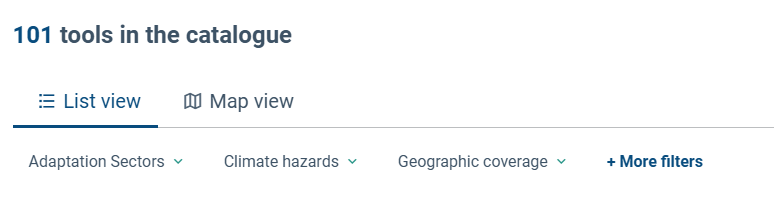
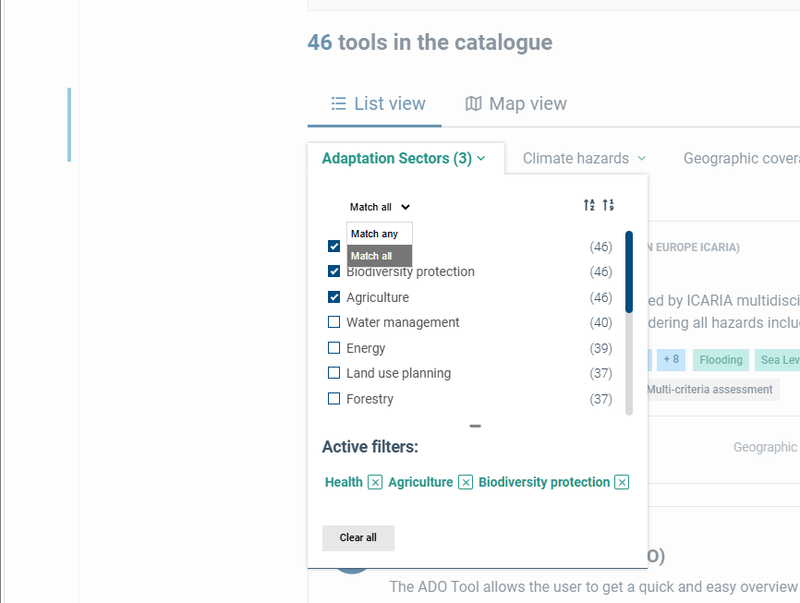
In the drop-down list, you can select multiple options, and at the top you can choose whether the list of results should include tools that are relevant for any of the chosen options, or only if they address all options (see screenshot). In the latter case, the number of results will be smaller.
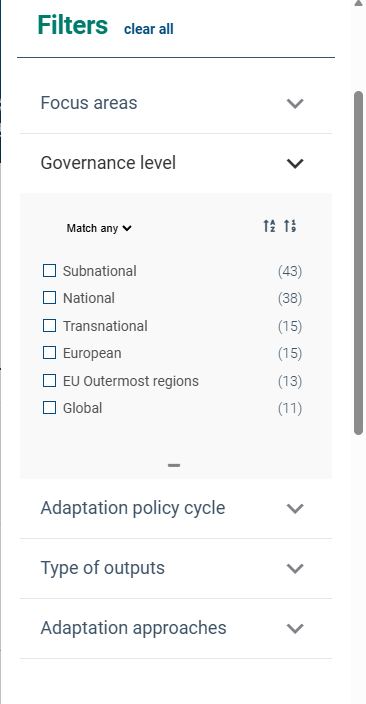
Clicking on “More filters” will open up a menu with additional filters. Click on one of the down arrows to see the available options (see screenshot).
What filters are available?
Filters are a very convenient way to narrow down the list of tools in the catalogue. The following filters are available in the Navigator:
Adaptation Sectors: What themes and sectors does the tool cover?
Climate hazards: What climate hazards does the tool include?
Geographic coverage: What is the largest geographic extent of the tool? (single option)
You can also apply one of the following additional filters:
Focus areas: Which type of places is the tool designed for? The list is based on the focus areas on Climate-ADAPT (taken as a subset from the other Adaptation Sectors)
Governance level: At which governance level(s) is the tool applicable?
Adaptation policy cycle: Which step or steps of the adaptation process does the tool support?
Type of outputs: Which (sort of) outputs does the tool provide, such as maps, tables, graphs, narratives?
Adaptation approaches: Does the tool provide information on Nature-based Solutions? Does it include specific functionalities for supporting/engaging vulnerable groups and for participatory processes? Does the tool allow you to make a cost-benefit analysis?
Where is the tool applicable?
Filter | What it means | Example |
|---|---|---|
Geographic coverage | What is the largest geographic extent the tool is covering? | Alpine region |
Governance level | At which (administrative/governance) level can the tool be applied? | National level and subnational level |
Focus area | Which types of places is the tool designed for? Urban areas Coastal areas Mountain areas | Mountain areas |
How can I compare tools?
In the catalogue, you can check the box that says “Compare” for each tool catalogue entry of interest. You can also click the “Add to comparison” button on the detailed view page of each individual tool. Once you have selected all the tools that you want to include, you can click on the “Compare selected tools” button to see how these tools compare on a few aspects including:
- Usability: This indicates how easy the tool and its outputs are to understand and interpret, with low = high-level expertise needed, moderate = some prior technical/scientific knowledge needed, and high = general user-friendly, minimal technical knowledge needed;
- Functionality: Number of adaptation policy cycle steps supported, from 1 to 6 steps.
How can I get assistance in finding suitable tools?
The Navigator has a “Guide me” and an AI Assistant that can be accessed from the main landing page. The “Guide me” narrows down your search results by asking questions on hazard, adaptation sector and adaptation support cycle step(s). The AI Assistant uses a Large Language Model (LLM) and builds on the trusted information from the Navigator Catalogue. Instead of searching through many tools themselves, you can describe your climate adaptation challenge, and the assistant finds the most useful tools.
The AI Assistant also suggests how you could use the tools together in a step-by-step plan — from checking climate risks, to assessing local vulnerability, to choosing and implementing adaptation measures. It is designed to recommend only tools from the Navigator Catalogue, and if it can't find one, it will say so and point you to other Climate-ADAPT resources.
What can I see in the Map View?
The Catalogue’s Map View shows tools developed for a specific country. You can see how many tools are available for each country and click “Explore tools” to view them. Some tools in the Navigator have global, European or transnational coverage, or are designed for specific cities and/or regions only and may also be useful in your region, but they are not shown in the Map View. To find them, go to the List view and apply the appropriate “Geographic coverage” filter. Alternatively, click “European-wide tools” in the Map view to see tools with European coverage. As in the Catalogue List View, you can apply filters at the top of the page to narrow your search.
How are tools prioritised in the Catalogue List View?
By default, tools are not prioritized; they are ordered alphabetically by title, from A to Z. You can change the ordering using the options at the top right of the list (see screenshot).
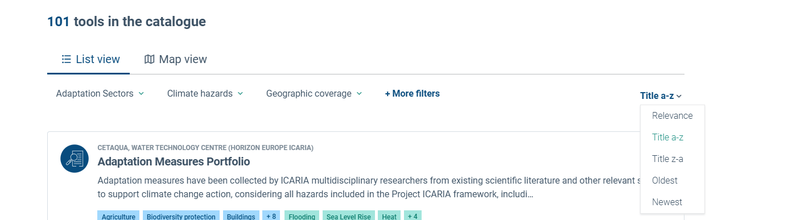
If you search for keywords, the tools will be sorted according to relevance, with the tools most relevant to these keywords shown on top.
How can I find more information about a tool?
In the Catalogue List view, you can click on the title or button that says “View” for any tool of interest to get more details. In this detailed Tool View, you get more information and background about the tool, its intended use and inputs and outputs. The page will also tell you what the relevance of the tool is to climate adaptation, and examples of its current use. On the right-hand side of the page, you can see some metadata such as the intended user group, geographic coverage and spatial resolution. On the Tool View page you can also add the tool to a comparison, and there is a link that will open the actual tool in a new browser tab or window.
The metadata shown on the Tool Page is the following:
- Also used as filters: Governance Level, Geographic coverage, support of adaptation policy cycle, adaptation sectors, climate hazards, type of outputs
- Spatial resolution: What is the spatial resolution of the data shown?
- Temporality of data: What is the time dimension covered by the tool’s information?
- Accessibility and usability: This indicates how easy the tool and its outputs are to understand and interpret, with low = high-level expertise needed, moderate = some prior technical/scientific knowledge needed, and high = general user-friendly, minimal technical knowledge needed;
- Data sources: Source of the underlying data (Where does the tool obtain its data from?)
- Tool validation use: Validated through peer-review, case studies, experts, reputable bodies, user tested, pilot-test [trusted tool]
How do I know if a tool is suitable for me?
The detailed Tool View page of each tool will give you more information on its intended use and user groups and will give you some brief examples of its current application. From this page you can also access the tool directly, so that you can explore it yourself and see if it indeed fits your purposes. All the tools included in the Navigator are freely available, although sometimes you will need to register free of charge first.
Maintenance
What happens to tools linked to a project (such as Horizon Europe) when the project finishes?
The catalogue only includes tools that are actively maintained or have been updated in the past 5 years. This ensures that the tools in the Navigator are current. If a tool is no longer updated, it will be removed from the catalogue in a future update.
How often will the Navigator be updated?
The Navigator will continue to evolve as its database is being updated. An update frequency has not yet been decided, but the catalogue is intended to be updated at least once a year. Each update will include reviewing existing tools against the quality criteria and assessing new ones. The user interface will also be refined to further improve the user experience.
Feedback
My tool is not listed. How can I propose it?
On the main page of the Navigator there is a button where you can submit your feedback. First, tools are considered for the criteria process if they are trusted. Trusted means either peer-reviewed, case-study validated, validated by experts or coming from a reputable institution, or user-tested/pilot-tested. Then, if your tool meets the following criteria, please feel free to contact us and we would be happy to add it to the catalogue:
It needs to be an online, interactive tool;
The tool needs to support climate adaptation;
It needs to be maintained or updated in the last five years;
It should be free of charge;
It should be available in at least one language of an EEA member state.
I have spotted an error; can you please correct it?
You are welcome to submit any feedback you have using the button at the bottom of the Navigator home page. It will bring you to the contact page on Climate-ADAPT https://climate-adapt.eea.europa.eu/en/contact
Language preference detected
Do you want to see the page translated into ?
Exclusion of liability
This translation is generated by eTranslation, a machine translation tool provided by the European Commission.
Exclusion of liability
This translation is generated by eTranslation, a machine translation tool provided by the European Commission.